ChatGPT query fan-out tool
You ask ChatGPT one question. It runs searches you never see. This free tool shows you every one, the pages they found and which pages the answer cites.
Free · Nothing leaves your browser · Not affiliated with OpenAI
What is query fan-out?
Query fan-out is what happens when an AI model searches the web to answer you. It turns your prompt into several searches, often in rounds. Then it reads the pages they find and writes its answer from them.
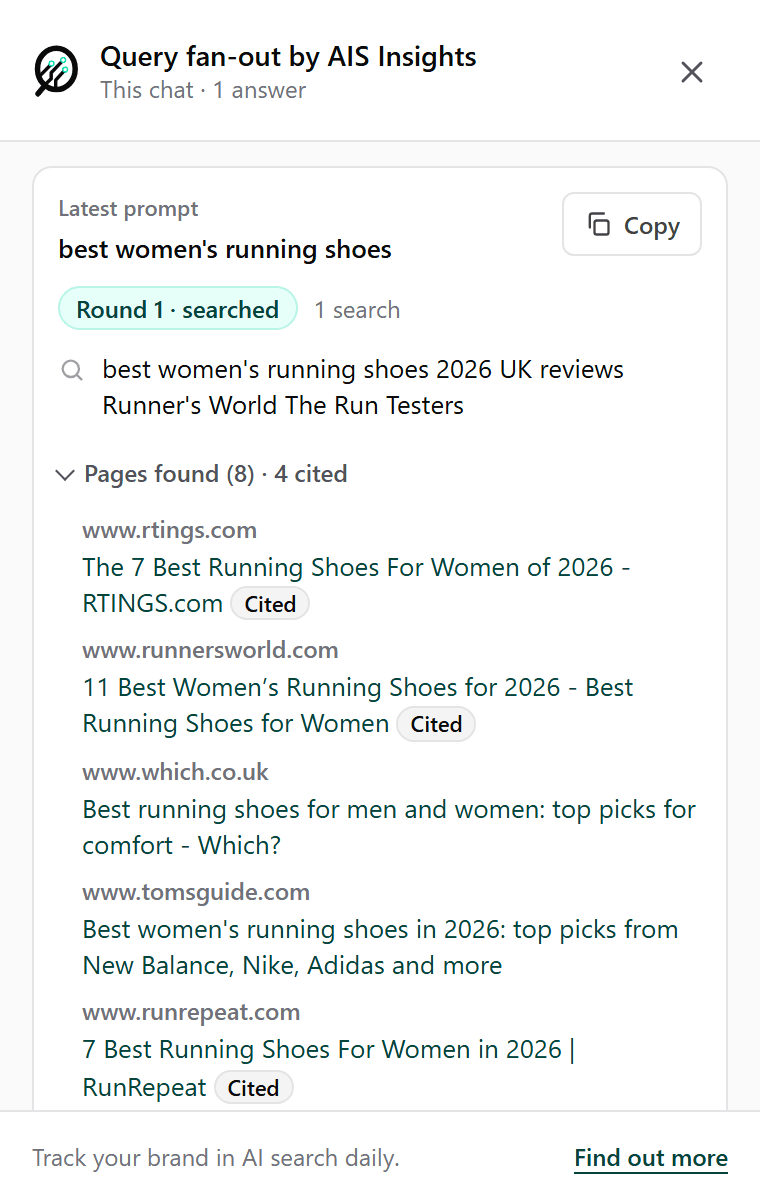
For example, we asked ChatGPT about women’s running shoes. It didn’t search for those words. It added the year, the country and two publishers’ names, then searched for that. ChatGPT shows you part of this. The tool shows you all of it.
Why does query fan-out matter?
If your page doesn’t come up in the search, it’s highly unlikely to make the answer.
ChatGPT writes from the pages its searches find. A brand it already knows can still get a mention without them. But if the searches never reach your page, the answer is highly unlikely to use it, however good it is.
Look at the running shoes answer above. One search found 8 pages. The answer cites 4 of them. Which? and Tom’s Guide were both found, and neither was cited. That gap between found and cited is where the work is.
How do you use a fan-out?
Start with the pages that were found and not cited.
Match the searches: Take the words ChatGPT searched for and check the page you want cited uses them, in its title and its first paragraph.
Rank for the relevant ones: Not every search is about you. Pick the ones that fit what you offer and add them to your SEO plan. A page that ranks for them is more likely to be found.
Read the cited pages: Open the ones the answer cites. Note how they’re laid out and what they cover that your page doesn’t.
List the publishers: A review site cited for your category that doesn’t mention you belongs on your PR list.
Ask again: Run the same prompt in a few days and compare. The searches move, and so do the pages.
What does the tool show?
Every search, round by round, and the pages it found.
Open the tool on any ChatGPT chat, new or old. You'll see each answer, newest first, with the searches ChatGPT ran in each round. Under them are the pages those searches found. The ones the answer cites are marked Cited. Hit Copy and the lot goes into your doc or spreadsheet.
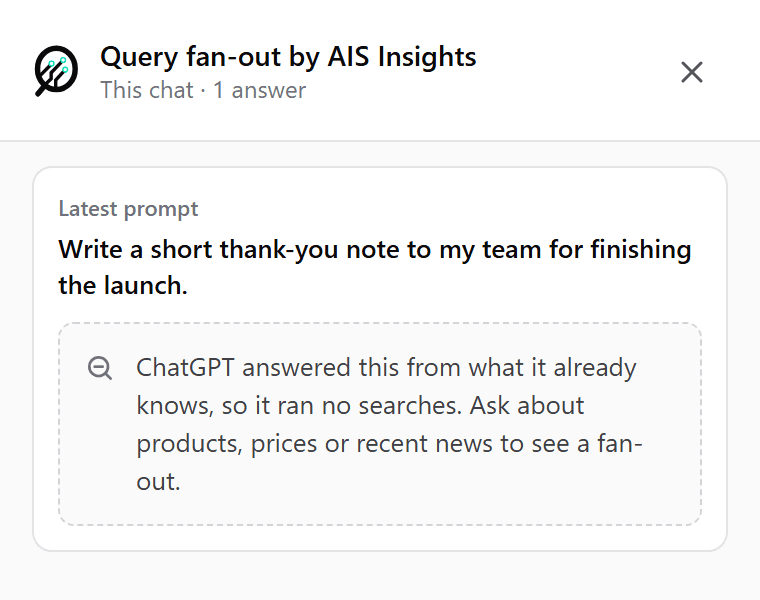
It tells you when ChatGPT didn't search.
Some answers come straight from what ChatGPT already knows. No search, no pages. The tool tells you when that happens, so you know which of your prompts depend on the web and which don't.
What it reads, and what it doesn’t
Nothing leaves your browser. The tool reads the chat you’ve got open, and only when you open the tool. It keeps nothing. It sends nothing to us. It asks Chrome for access to chatgpt.com and nothing else. The privacy policy has the detail.
It reads ChatGPT’s web searches. Not the product searches behind shopping cards, and not other AI models. It shows one chat, right now. It doesn’t keep a history.
From one chat to every day
One chat is a snapshot. The same prompt can give a different answer from one asking to the next. Tomorrow ChatGPT may run different searches and cite different pages.
A snapshot isn’t a trend. A change to your page can take a while to show up in the answers. You only know it worked if you keep checking.
That’s what AIS Insights is for. We ask your prompts on every model on your plan, every day. We save the sources each answer cites and check it for your brand and your competitors. Where a model shows its searches, we save those too. See what we track on each model.
Query fan-out, answered.
What is query fan-out?
Query fan-out is what happens when an AI model searches the web to answer you. It turns your prompt into several searches, often in rounds. Then it reads the pages they find and writes its answer from them. The searches decide which pages the answer can draw on, so they decide which sources it cites and which brands it names.
Is the query fan-out tool free?
Yes. No account, no sign-up. Add it to Chrome, open a chat on chatgpt.com and click the tool.
Does the tool send my chats anywhere?
No. It reads the chat you have open, and only when you open the tool. It keeps nothing and sends nothing to AIS Insights or anyone else. The privacy policy has the detail.
Why does an answer show no searches?
ChatGPT answered it from what it already knows, without searching the web. Prompts about products, prices or recent news usually make it search.
Does it work with other AI models?
No, it reads ChatGPT only. To see the searches and sources behind the answers on every model on your plan, up to seven, AIS Insights tracks your prompts every day.
Track the fan-out every day.
Start with the free tool. When you want the trend, add your brand and approve your prompts. We'll check every answer, every day, for the brands it names and the sources it cites.
Up to seven models · Refreshed daily